
Approvals is the coach's one queue for everything that needs a decision — work someone submitted, and requests to join the team. It's also the only screen where those decisions actually happen, so a coach never has to hunt across the app to find what's waiting on them.
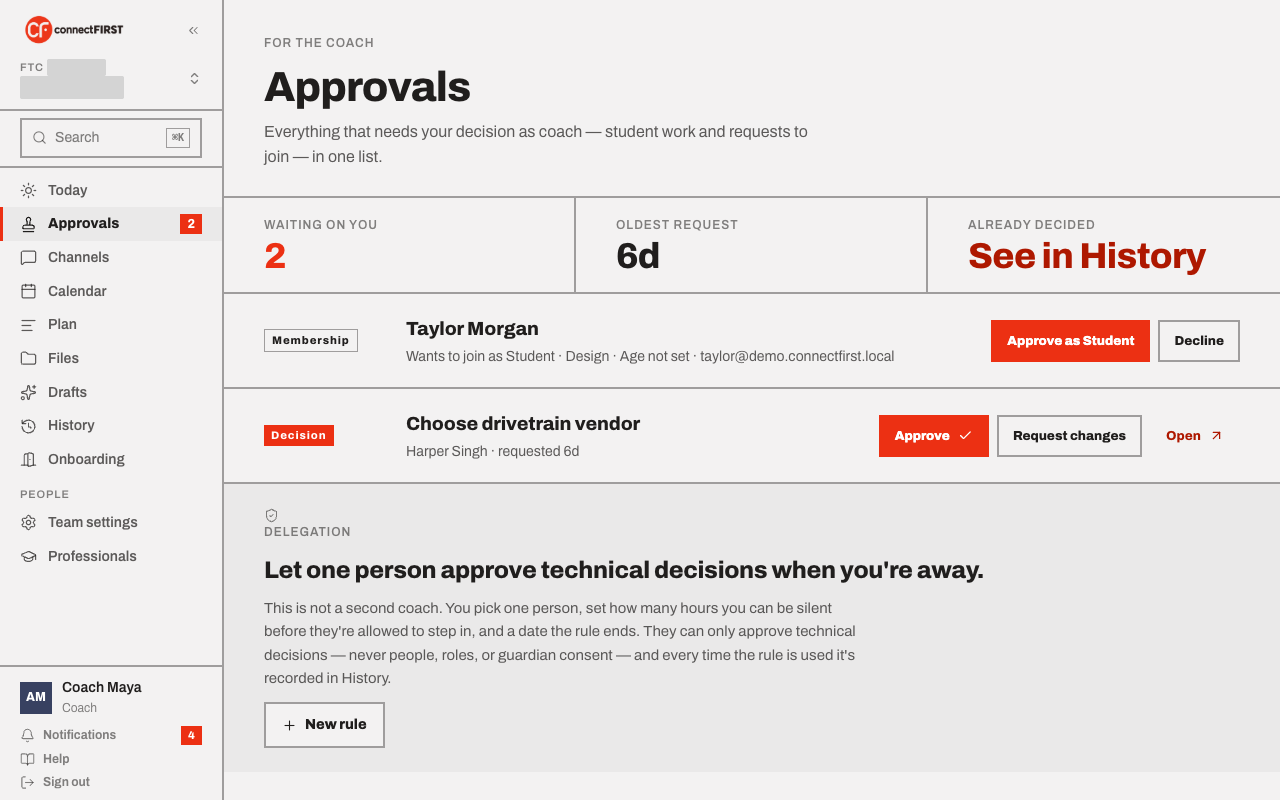
Deciding on work
Each row shows what was submitted, who submitted it, and how long it's been waiting. From here you can:
- Approve — marks the work done.
- Request changes — sends it back to the owner with a note on what's missing; it returns to In progress.
- Open — see the full item, including the evidence links and note the owner attached when they submitted it.
Deciding on membership
A membership request (a guardian has consented for a student, or someone asked to join without an invite) appears here too, waiting on the same queue as work. Approving it is what actually lets that person into the team's workspace — nothing about the team is visible to them until you do.
Letting someone else decide when you can't
Delegation lets you name one person — never a second coach — who can approve technical decisions if you go quiet for a set number of hours. They can never approve people, roles, or guardian consent; every use of the rule is written down in History, so it's never a silent handoff.
Already decided?
Approvals only shows what's still open. Anything you've already approved or sent back moved to History, along with who decided it and when.