
Drafts writes the repetitive updates a coach sends anyway, so you're editing instead of starting from a blank page.
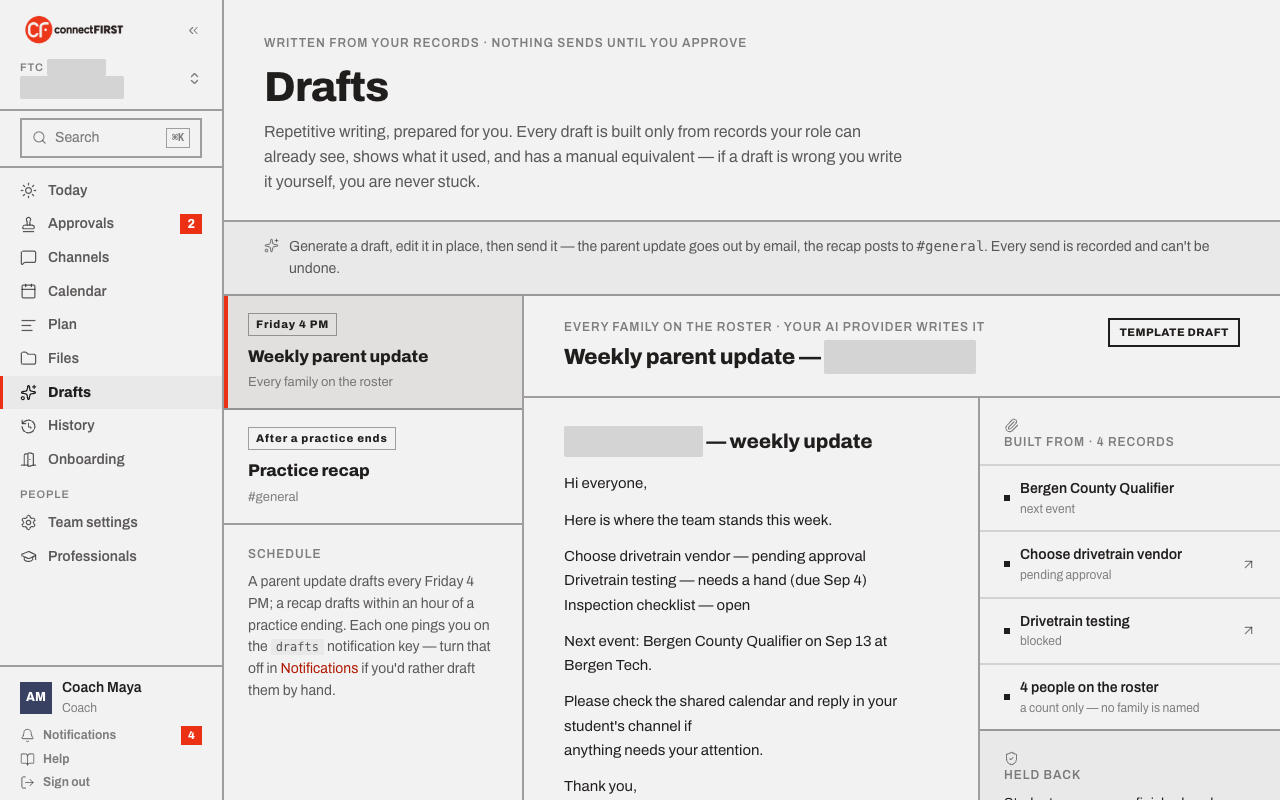
Two kinds of draft
- Weekly parent update — what moved this week, what's coming, and the one thing a family has to act on. Goes out by email to every family on the roster, written for Friday 4 PM.
- Practice recap — a short read for anyone who missed the session:
decisions made, what got unblocked, who still needs a follow-up. Posts
to
#general.
Every draft shows its sources — and what it left out
The panel on the right lists exactly which records the draft was built from, and a Held back section spelling out what it deliberately never includes: a student named against unfinished work, anything outside the audience's own access, and anyone who hasn't replied. Nothing here is a black box.
Generate, edit, then send
Generate draft produces the first pass; Edit lets you rewrite any
part of it before it goes anywhere. Nothing sends until you click Send —
the parent update goes out by email, the recap posts to #general, and
every send is recorded in History. A sent draft can't be
edited or unsent, so it's kept exactly as a record of what actually went
out.
If you'd rather write it yourself
Every draft screen has an "or do it yourself" link straight into Channels — a draft is a head start, never the only way to say something to the team.
Whether an outside AI provider is used
If the coach hasn't turned one on in Team settings, drafts are built from a structured template instead — still built only from your own team's records, just without an outside model doing the writing.