
Notifications has two tabs: an Inbox of everything that's happened, and Settings for how you want to hear about it.
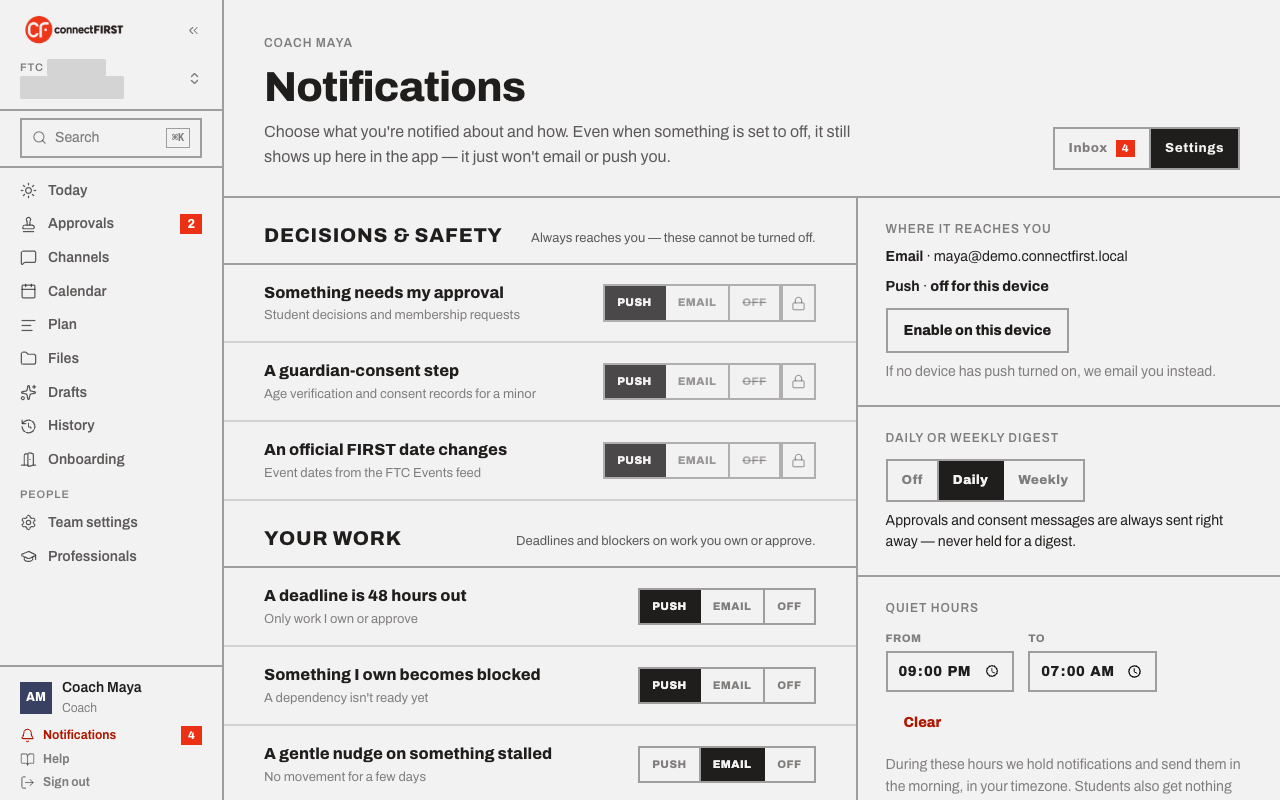
Every notification still shows up here
Turning something to Off only stops the email or push — it still lands in your Inbox. Nothing silently disappears.
What can't be turned off
Decisions & safety — something needing your approval, a guardian-consent step, an official FIRST date changing — always reaches you. Everything else, grouped under Your work, is yours to route: Push, Email, or Off, per event type.
Digest and quiet hours
Choose a daily or weekly digest for anything non-urgent. Quiet hours hold notifications until morning, in your own time zone — approvals and consent messages are always sent right away regardless, since those can't wait for a digest. A student additionally gets nothing during school hours, and that one isn't adjustable.
Push needs this device turned on
Push is per-device — Enable on this device turns it on for the browser or app you're using right now. If no device has push on, email is always the fallback.